 Home Ledger · घर खाता
हिन्दी
Home Ledger · घर खाता
हिन्दी
For homes in India
Your home's khata, settled to the rupee.
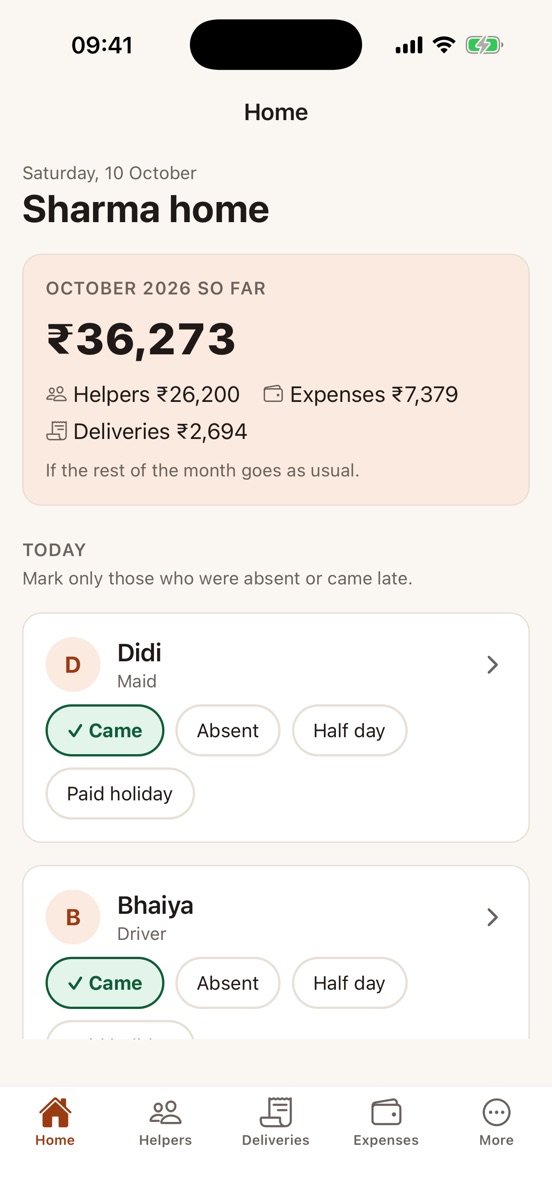
The cook, the maid, the driver, the doodhwala, the newspaper. Home Ledger keeps who came, who didn't, what was given in advance and what is owed. Mark only those who were absent or came late; at the end of the month it works out exactly what to pay.
काम वालों की हाज़िरी, एडवांस और तनख़्वाह, और रोज़ के दूध, अख़बार और प्रेस का हिसाब — एक जगह, पैसे-पैसे तक सही।
In English, हिन्दी and ਪੰਜਾਬੀ.
Sound familiar?
Month-end shouldn't mean an argument.
"She took leave on the 3rd, didn't she? Or was it the 5th?"
Nobody remembers by the 30th. Home Ledger does, with the date.
"How much of the advance is still left?"
Every advance, and every rupee taken back from salary, adds up on its own.
"The milk bill says 30 days. We were away for four."
Skipped days are marked when they happen, so the bill is right the first time.
How it works
A minute to set up. Mark only the absent ones. Done at month-end.
Add who comes, and what
Name, work and salary for each helper; how much milk or how many papers for each delivery. About a minute each.
Mark only the absent ones
Everyone else counts as came. Mark who was absent or came late, and the days milk or paper didn't come or came more — one tap, even without signal.
Pay and share at month-end
The app works out the salary and the bills. Pay by UPI, then send the statement on WhatsApp, with the dates.
Features
Everything a household keeps in a diary, kept properly.
Salary worked out the way you agreed
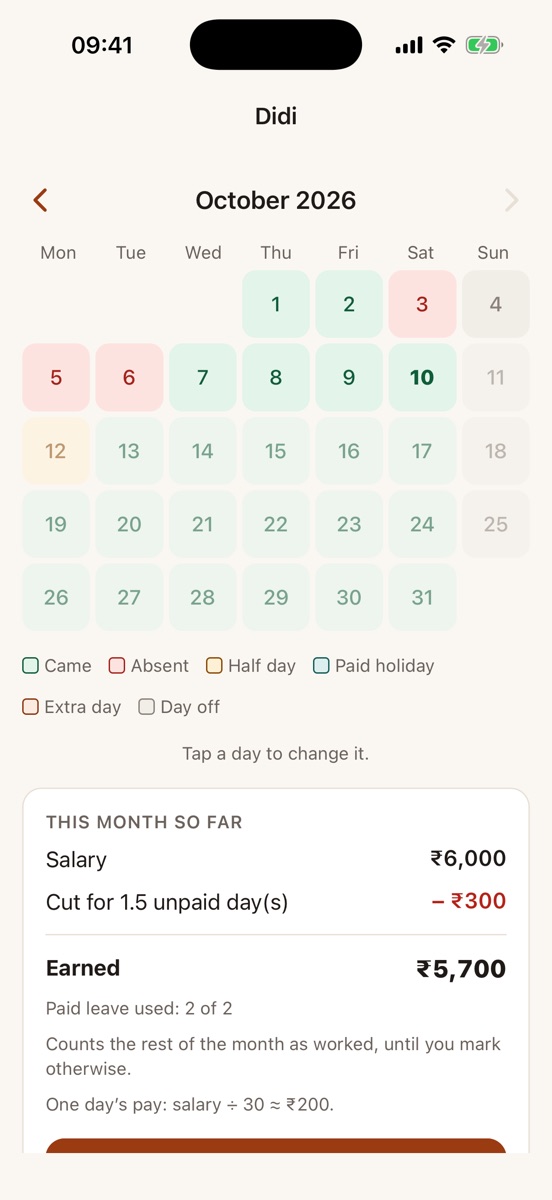
Every helper's month on one calendar, and the pay worked out from it, explained line by line.
- Paid leave per month, in whole or half days
- Your rule for a day's pay: 30 days, the days in the month, or working days only
- Joined mid-month, a raise from the 15th, an extra Sunday — all counted
- The salary month by the calendar, or from the day they joined (10 Jan – 9 Feb)
- Advances recovered in full or in instalments, whichever you agreed
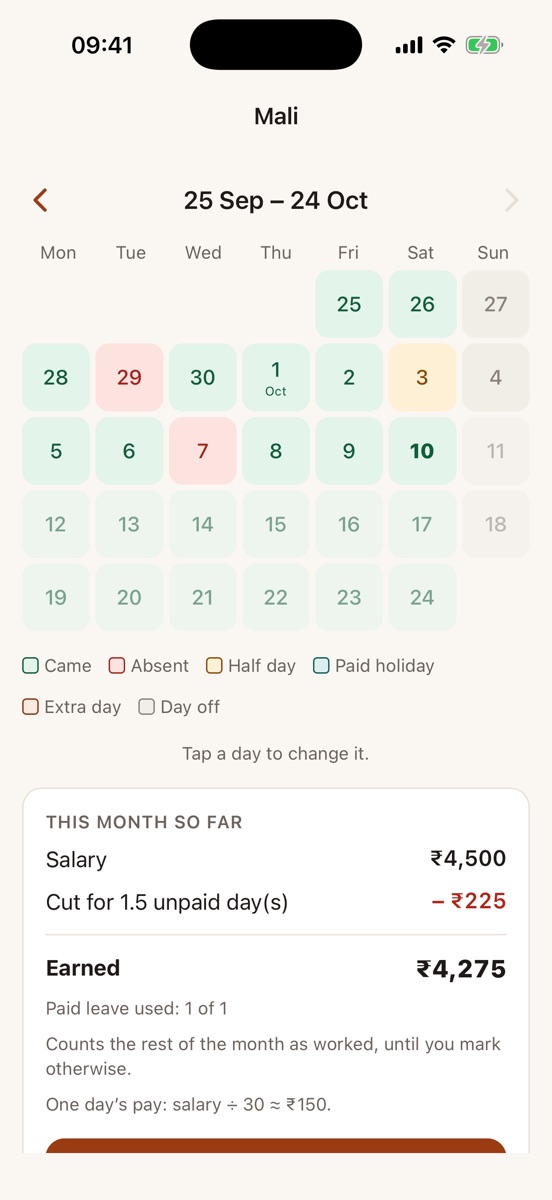
A month from the day they joined
Not every salary runs from the 1st. If someone joined on the 25th, their month can run from the 25th to the 24th, and the calendar, the salary and the payslip all follow it.
- Calendar month or from the joining day, chosen when you add them
- Fixed once the first salary is paid, so a paid month never shifts
- Deliveries and expenses stay on calendar months
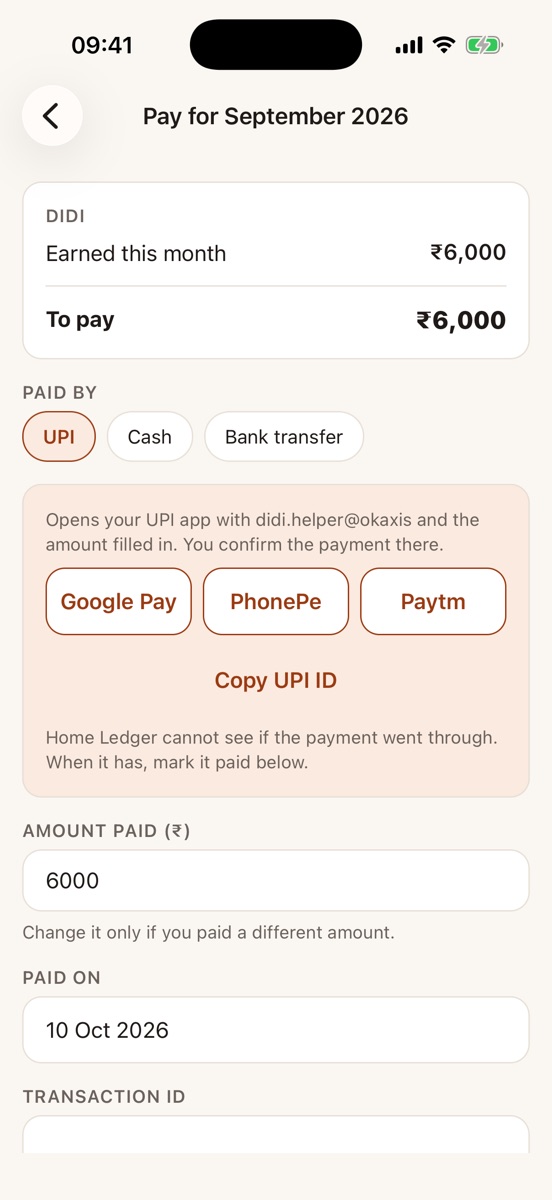
Pay by UPI. Share on WhatsApp.
When the month is done, pay from your own UPI app with the amount already filled in, then send the statement — every amount and the exact dates behind it.
- Opens Google Pay, PhonePe or Paytm; you confirm the payment there
- A payslip PDF in English, Hindi or Punjabi, ready to share
- The paid month is locked, so the record never changes behind anyone's back
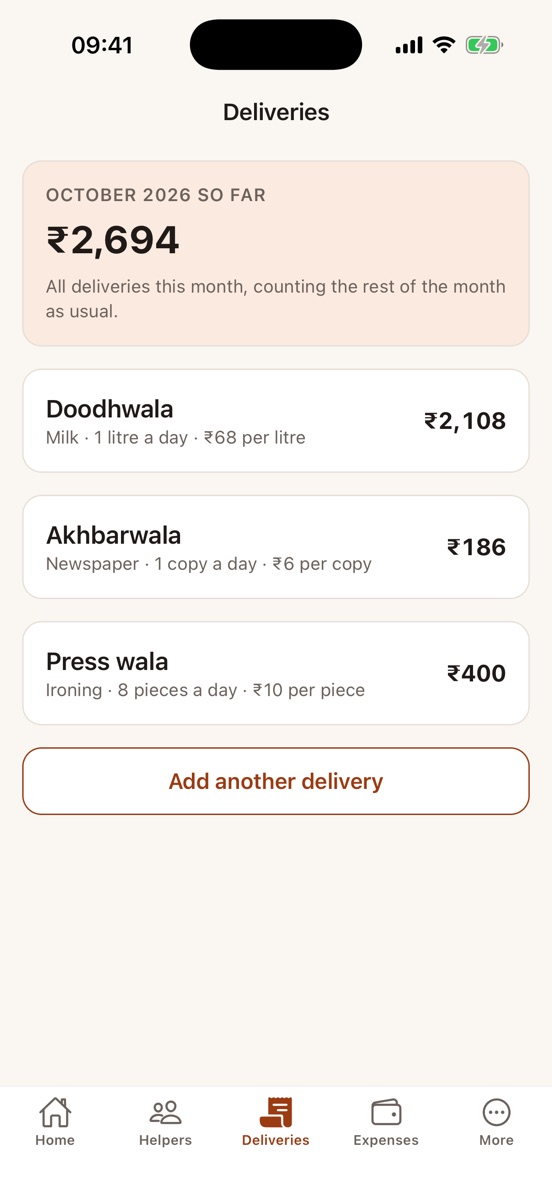
The daily khata, without the notebook
Milk, newspaper, ironing, water cans, flowers. The usual quantity counts by itself; mark only the skipped day or the extra litre.
- The bill so far, every day of the month
- Price went up on the 10th? Both rates on the bill, line by line
- Litres, packets, pieces, copies or kilos
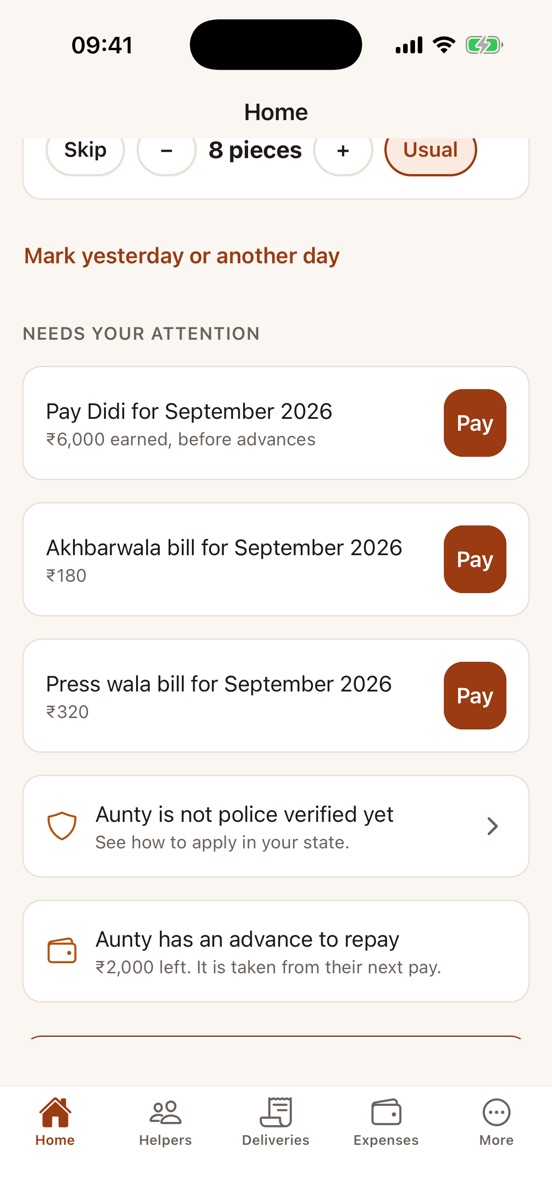
It tells you what needs doing
Home shows a short list each day, with a button for each: last month's salary still to pay, a bill to settle, an advance being repaid, a helper not yet police verified.
- An evening reminder to mark anyone who didn't come, if you want one
- Mark yesterday or any earlier day you missed
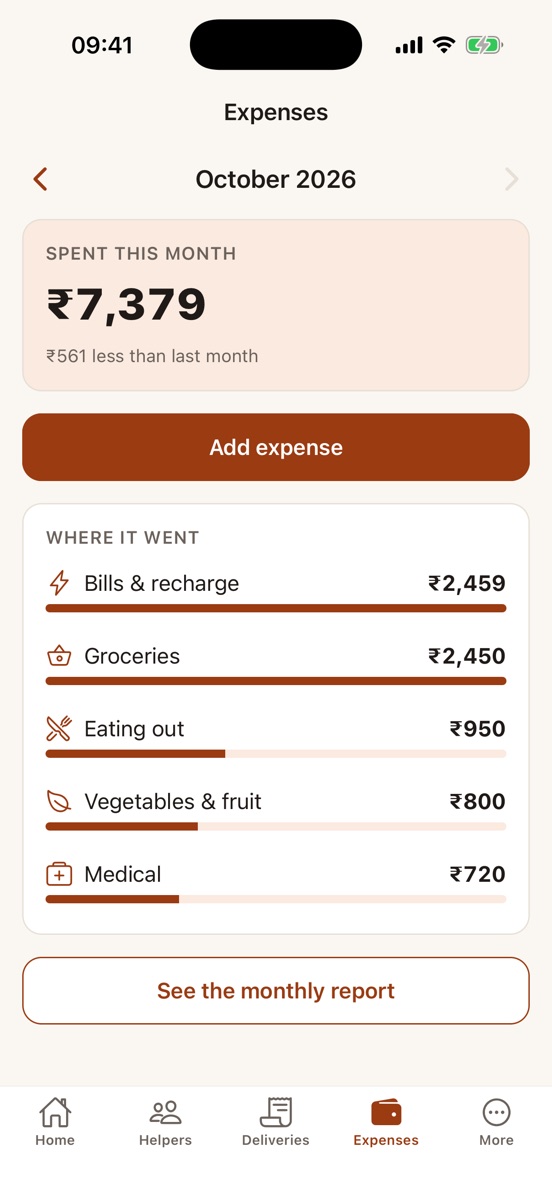
Everyday expenses, in seconds
Groceries, bills, medicines, school fees. Add each in seconds, and see where the month's money went and how it compares with last month.
- Shared with everyone in your home
- Where the money went, by category, and how it compares with last month
- Works without signal, like the rest of the app
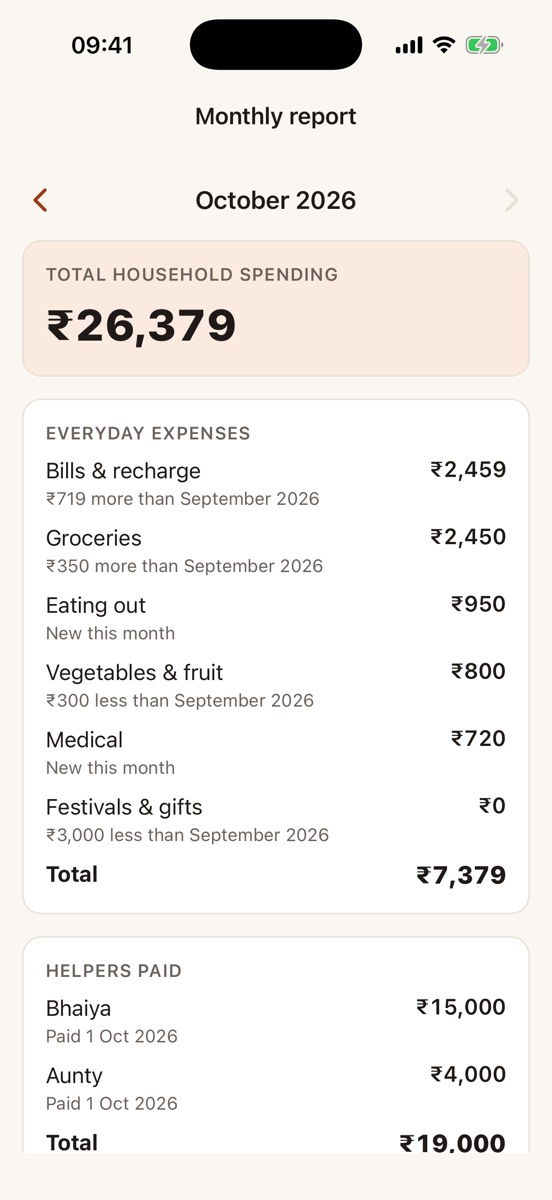
The whole month on one page
At month-end, or any day you want, see everything the home spent: everyday expenses, the salaries you paid and the bills you settled, with one total.
- Each category against last month: more, less, or new
- Every salary and bill with the date it was paid
- Share the PDF on WhatsApp or anywhere, in English, Hindi or Punjabi
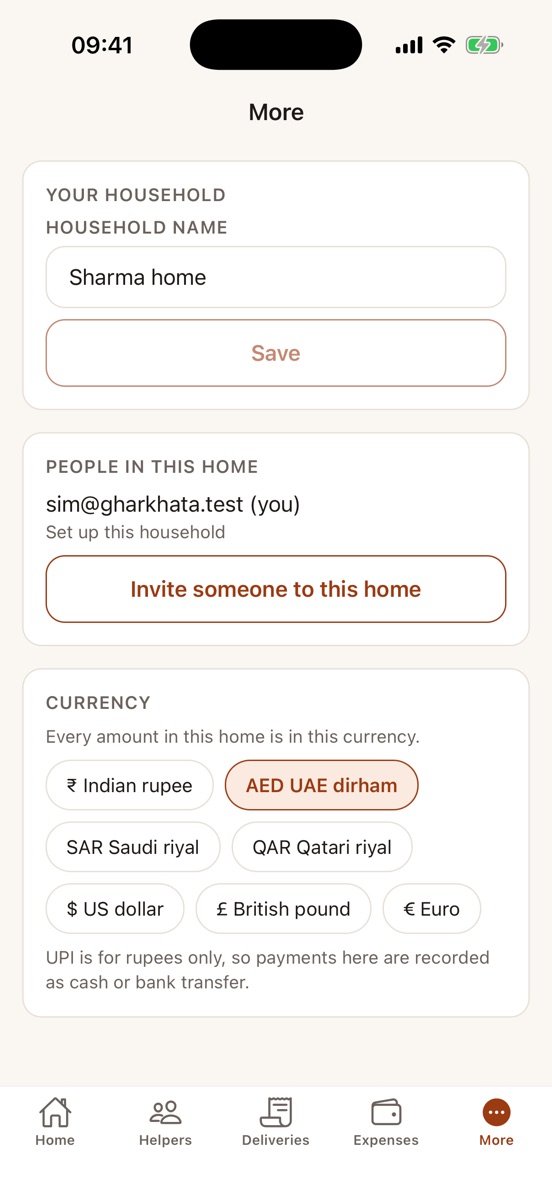
Living outside India? Keep it in your currency.
In Dubai, Riyadh, Doha, London, New York or anywhere in Europe, the same khata works. The owner of the home picks its currency, and every salary, bill and expense shows in it.
- Rupee, UAE dirham, Saudi riyal, Qatari riyal, US dollar, British pound or euro
- Set once by the owner; everyone in the home sees the same
- Payments recorded as cash or bank transfer; UPI stays for rupees
Safety
Know who works in your home.
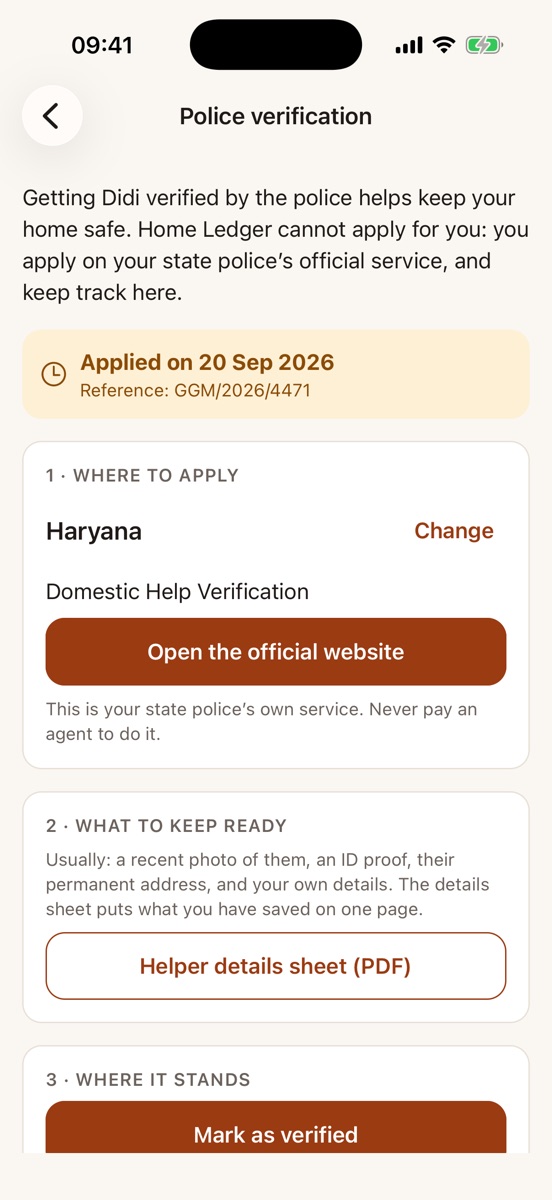
Keep each helper's address, native place and an emergency contact, their photo, and their ID documents — with their agreement, and visible only to the owner of the home.
- Police verification, step by step. Your state police's official service, a one-page details sheet to fill it in, and where it stands: applied, reference number, verified, certificate.
- Aadhaar only masked. The first 8 digits hidden, never the number stored as data.
- Their consent first. The app asks you to confirm they agreed before any photo or document is kept.
- Deleted when they leave. Documents go 90 days after their last working day.
Home Ledger never applies to the police for you and never contacts your helpers. You stay in charge.
And also
Made for how Indian homes run.
Your data
Your household's records stay yours.
- Stored in India (Mumbai). Only the people in your household can see them; the database checks every request.
- No ads, no tracking, no analytics. We never sell or share your data.
- We never take or hold your money: payments go from your UPI app straight to the person you pay.
- Delete your account from inside the app, any time; the owner of the home can delete a helper and all their records.
Questions
Asked often
Do I have to mark attendance every day?
No. Everyone counts as came. Mark only those who were absent or came late (or had a holiday or an extra day), and deliveries that didn't come or came more.
Does Home Ledger pay my helper?
No. It opens your own UPI app (Google Pay, PhonePe, Paytm) with the amount filled in; you confirm the payment there and mark it paid in Home Ledger. Cash and bank transfer can be recorded too.
Does my helper need the app?
No. Only your household uses Home Ledger. You can send your helper their statement or payslip on WhatsApp.
Can my family use it too?
Yes. Invite up to six people in your home with a one-time code; everyone sees and marks the same khata. Only the owner of the home can see ID documents.
Will it apply for police verification for me?
No. It shows your state police's official service, gives you a one-page sheet with your helper's details to fill the form, and keeps track of where your application stands. You apply yourself.
Does it work without the internet?
Yes, for marking days. Changes wait on your phone and go through when you are back online.
My helper joined on the 10th. Is their month the 10th to the 9th?
Your choice. When you add them, pick From joining day (10 Jan – 9 Feb) or Calendar month (the first month paid for the days worked). You can change it until the first salary is paid.
Is it in Hindi?
Yes — English, Hindi and Punjabi, and you can switch any time. Payslips can be made in any of the three.
Can I use it outside India?
Yes. The owner of the home can set the currency in More: rupees, UAE dirham, Saudi riyal, Qatari riyal, US dollar, British pound or euro. Everyone in the home then sees every amount in it. UPI works only with rupees, so elsewhere you record payments as cash or bank transfer. Your records are still stored in India (Mumbai).
When can I get it?
On Android, now: get Home Ledger on Google Play. The iPhone app is coming soon to the App Store.
Close the month in a minute.
घर का हिसाब, बिना बहस।
Questions? support@ambiful.com